99Exch APK — Official Android Installer to Bet When Browser Links Drop
Looking for the 99Exch APK? It sits behind the Download .apk row on any 99Exch mirror sign-in card, right below Login with Demo ID. One tap saves it. Switch on Install unknown apps for your browser, open the file, then sign in with the ID you already use. A parse error means the download broke, so tap once more.
Easy 99Exch APK Install, Start to Finish in Six Steps
Six taps, give or take. Most people who get stuck on the 99Exch APK get stuck at step three, because Android hides the permission one screen deeper than they expect.
Reach a working mirror Open whichever 99Exch address loads on your network today. The login card there carries a Download .apk row below Login and Login with Demo ID; on the .com lobby a Download APK layer pops over the odds grid instead, with a close X if you do not want it. Which address is open on which day is tracked on our 99Exch Live mirror page.
Tap Download .apk once Just once. A second tap starts a second file and Android will happily save both, which causes trouble later.
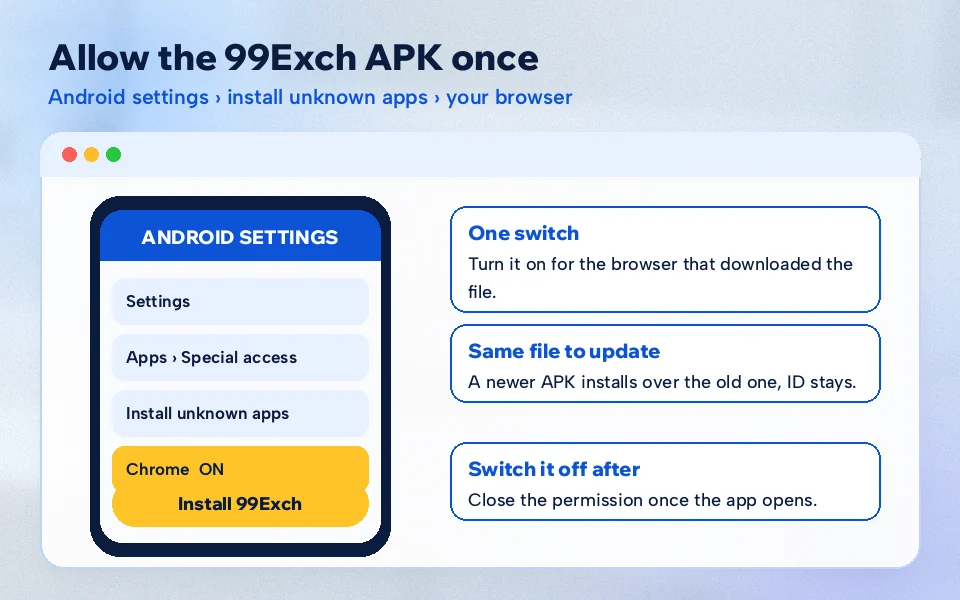
Allow the source When the warning appears, tap Settings in that pop-up. It drops you on the Install unknown apps screen for the app that holds the file (your browser, or Files if you open it from there). Turn on Allow from this source.
Go back and open the file One press of back. On most handsets the 99Exch install prompt reappears without you hunting for it; where it does not, the file is waiting in Downloads.
Install, then Open Android shows the app name and an Install button. Wait for it to finish (don't swipe away mid-install) and tap Open.
Sign in with your existing ID Same username, same password as the browser. Nothing new to create. If you have no ID yet, the fresh 99Exch ID request comes first, and you return here with the details.
One composite case. Someone taps Download .apk, nothing seems to happen, taps again. Two files land in Downloads, the second one named with a (1) on the end. They open the first, half-written file and Android throws a parse error. Delete both, download once, wait for the progress bar to complete. Fixed.
That last point matters more then it sounds. Android does not check whether a file finished downloading before it tries to read it, so a partial 99Exch APK looks like a real one right up untill the installer opens it.
What the first launch of the 99Exch app should look like
Familiar, mostly. The installed 99Exch app runs the same build the mirror addresses load, so expect the same sign-in card: a User Name field, a Password field, Login, and Login with Demo ID underneath. Type the ID exactly as the desk sent it, capitals included. If the password was a temporary one, the change-password routine is covered on the 99Exch login help page rather than repeated here.
Once you are in, the lobby is the one you already know from the browser (cricket, football, tennis, casino, Andar Bahar) and the balance matches to the rupee, because it is the same account. If the numbers ever look different between app and browser, pull down to refresh before assuming anything is wrong; one of the two was probably just showing an older screen.
Three ways the 99Exch file reaches a phone, and how each one installs
Straight from the browser
The cleanest route. You tap Download .apk on a 99Exch mirror, Chrome (or Samsung Internet, or whatever you use) saves it, and the install prompt names that browser. The unknown-apps switch goes on for the browser.
From the Files app
If you closed the download notification, open Files or File Manager, go to Downloads and tap the 99Exch .apk there. Now Android asks permission for the file manager instead of the browser, which is why some people flip the switch twice and wonder why. Different app, different switch.
Shared by a friend
Through the Share This Apk to Friend row, or a chat attachment. It works, but the permission now belongs to the chat app, and you are trusting a copy. Read the genuine-file check further down before tapping Install.
A worked example, since this is where most confusion lives. Say you are on a Realme phone and you downloaded the 99Exch APK in Chrome last night, then cleared the notification. This morning you open File Manager and tap the file. Android says installs from File Manager are not allowed. You already turned the switch on for Chrome yesterday, but that does not count; tap Settings in the pop-up, enable File Manager, press back, and the install screen comes up. Two permissions, one install, and neither is a 99Exch setting.
Quick 99Exch APK Permission Path on Samsung, Xiaomi, Vivo, Realme and OnePlus
Brands rename menus. The permission itself is the same Android switch on every phone, so if the exact words below differ on yours, search Settings for the word unknown and you will land on it. These paths are approximate (they shift between software updates), and they only matter if you skipped the pop-up shortcut in step three of the 99Exch APK install.
Phone brand
Where the switch usually sits
What to turn on
Samsung
Settings, Apps, the menu with three dots, Special access, Install unknown apps
Your browser or My Files, then Allow from this source
Xiaomi / Redmi / POCO
Settings, Apps or Privacy protection, Special permissions, Install unknown apps
The browser that saved the 99Exch file
Vivo
Settings, Security or Privacy, Install unknown apps
Browser entry, switch on
Realme
Settings, Privacy or Security, Install unknown apps
Browser or File Manager
OnePlus
Settings, Apps, Special app access, Install unknown apps
Chrome or Files, Allow from this source
Older handsets work a little differently. On phones still running Android 7 or earlier there is no per-app list at all, just one Unknown sources toggle under Security that covers every app at once. Turn that on, install the 99Exch APK, and turn it straight back off. Same result, blunter switch.
Turn it on for the one app that holds the 99Exch APK, nothing else. You can switch it back off after the install; the app stays put and keeps working.
99exch apk
99exch download apk
99exch app download apk
99exch com apk
99exch download
99exch app download apk latest version
99exch apk for android
99 exch apk install
99exch apk latest version
99exch apk kaise download kare
Clear 99Exch Download APK Answers, Sorted by What You Typed
What the 99exch apk search on this page lands on
Typed 99exch apk into a search bar? What you get from a mirror is a single file that drops into your Downloads folder. Tap it and Android shows the 99Exch name above an Install button; that pairing is your sign the right file opened, and not some leftover from another app.
Sign-in afterwards uses the username you were already given. Nothing about the ID changes between app and browser.
The 99exch com apk prompt over the lobby
People who type 99exch com apk have usually seen the Download APK layer that floats over the .com lobby. It points to the same installer as the .apk row on the other mirrors; close it with the X if you only want to browse odds.
Getting the 99exch app download apk latest version
Every mirror serves the same build, so the latest version is simply whatever the Download .apk row gives you today. To refresh, install the new file over the old one in this order:
Download the file again from a mirror.
Open it and tap Update or Install.
Sign in once if asked.
99exch download versus 99exch download apk
The two searches end up at the same file. A 99exch app download apk query comes from Android users; iPhone owners searching 99exch download get the browser route instead, because iOS will not open an .apk at all.
Android: the .apk from a mirror.
iPhone: a working address in Safari.
Genuine 99Exch APK Check Before You Tap Install
Copies of the 99Exch APK float around download sites and forwarded chats. Some are fine repacks. Some are not, and you cannot tell from the icon. The rule we follow is short: the only file worth installing is the one you pulled yourself from the Download .apk row on a 99Exch mirror, or from the APK layer on the .com lobby.
Three things to look at on the file itself. The name ends in .apk and nothing after it; a file called something like 99exch.apk.zip or 99exch.exe is not an Android installer. It sits in Downloads with a timestamp from a minute ago, matching your own tap. And the size should be in line with what you got last time from the same mirror row, not a fraction of it (a tiny file is usually a broken download, sometimes a fake).
The Share This Apk to Friend row shown at the .live, .red and .green addresses, right on the sign-in screen, is how a lot of copies travel. Useful when a friend is setting up. Still, if a 99Exch file reaches you through a chat, it is cleaner to open the mirror yourself and tap Download .apk fresh than to trust whatever was forwarded three times.
One more tell. A genuine 99Exch APK asks you for the username and password you already use. Anything that asks for a card number, an OTP from your bank or a payment before you have even logged in is not the 99Exch app.
The permission belongs to the app holding the file, usually the browser, and it can be turned off again once 99Exch is installed.
99Exch APK or Browser: The Working Route on Blocked Days
Picture a T20 evening where your saved 99Exch bookmark returns nothing. That happens because Indian internet providers block betting domains from time to time, and it is why 99Exch keeps several mirror addresses alive at once. With the browser you hunt for the one that still opens. With the APK installed you mostly skip the hunt: the phone already holds the same build every mirror serves, and the app keeps loading while a web address sits blocked.
99Exch APK on Android
Opens from the home screen with one tap.
Keeps working when a browser address gets blocked.
Needs the unknown-apps switch once, plus a reinstall when a newer file comes out.
Android only.
99Exch in the browser
Nothing to install, works on iPhone too.
Depends on which mirror address is reachable today.
Bookmarks go stale when an address is blocked.
Always the newest screens, no update step.
Same ID, same balance, either way. Plenty of people keep both: the 99Exch app for match nights, the browser as a fallback when they are on a borrowed phone. If you want the wider comparison of what the app does once it is open, the 99Exch app overview covers screens and features; this page sticks to getting the file on the phone.
Safe 99Exch APK Update by Installing Over the Old Copy
There is no store pushing updates here. A sideloaded 99Exch APK updates the old-fashioned way: you download the newer file and install it on top.
Do I uninstall first?
No. Open the new file and Android offers Update (or Install, on some phones) over the existing 99Exch app. Your ID sits on the 99Exch side, not inside the app, so nothing is lost either way.
When is an update needed?
Usually when the app starts acting oddly, a screen will not load, or the mirror login card serves a file that looks different from the one you have. Hard to say exactly how often; it is not on a fixed calendar.
What if Update fails?
Then uninstall the old 99Exch app, install the fresh file, and sign in again. Takes longer, works almost every time.
Does the switch need turning on again?
Only if you turned Install unknown apps off after the first install. Then flip it on for the browser, update, and switch it off again if you like.
In practice the reinstall route is also the cure for most weird behaviour. Clearing the app data is the step people try first. A clean reinstall from a 99Exch mirror tends to fix it faster.
Small habit worth picking up: after an update, delete the old 99Exch .apk from Downloads. Otherwise the folder fills with near-identical files, and the next time something breaks you may reinstall last month's build by mistake and wonder why nothing changed.
Moving the 99Exch APK to a new phone
The account is not stored in the phone. That is the whole trick with a handset swap: 99Exch keeps your ID and balance on the exchange, so the new device only needs the file and the switch. What trips people up is a phone-cloning tool silently carrying last year's 99Exch build across. If the cloned app crashes or refuses to sign in, remove it and take a fresh download from a mirror.
Selling or handing down the old phone? Log out of the 99Exch app first, then uninstall it. Takes ten seconds and keeps your ID off a device you no longer hold.
Fast Fixes for the Three 99Exch APK Install Errors
Read the wording before you touch anything. Android uses a handful of fixed messages when a 99Exch APK refuses to go in, and each points to a different fix, so the table below is sorted by the words on your screen rather than by phone brand.
Message on screen
What it usually means
What to do
There was a problem parsing the package
The file is incomplete, or two downloads got mixed up
Delete every 99exch .apk in Downloads, tap Download .apk once, wait for the bar to finish
Blocked by Play Protect
Android scanning a file that did not come from the Play Store
Check the file came from a 99Exch mirror row yourself; Play Protect then shows a details option where you can choose to install anyway
App not installed
An older 99Exch app with a different signature is in the way, or storage is full
Uninstall the old app, free some space, install the fresh file
Install button greyed out
Allow from this source is still off
Go back to the switch in the card at the top of this page
The Play Protect one makes people nervous, understandably. It is a general warning Android shows for any app installed outside the store; it does not single out 99Exch. That said, it is exactly the moment to check you have the genuine file and not a forwarded copy.
When the 99Exch app installs but then misbehaves
Installed fine, but something is off. A few patterns come up again and again:
Stuck on a blank or loading screen. Close the 99Exch app fully from recent apps and reopen it. If its still blank, switch between mobile data and Wi-Fi once; a reinstall from a mirror is the next step.
Username or password rejected. That is an account question, not an APK one. The same details fail in the browser too, which is a quick way to confirm it.
A warning that the app was built for an older Android. Android shows this for many sideloaded files. Tap through it; if the 99Exch app then crashes, fetch the newest file and install over it.
The icon vanished after a phone cleaner ran. Some cleaner apps flag sideloaded packages. Reinstall, and leave 99Exch off the cleaner list.
Two of those rows trace back to one root cause: the download itself. If you are unsure which message you saw, start over with a single fresh tap on Download .apk; that clears more 99Exch install trouble than any setting does.
99Exch APK FAQ With Verified Answers
Where do I get the 99Exch APK download latest version?
Tap the Download .apk row on any working 99Exch mirror login card, or the Download APK layer on the .com lobby. Every mirror serves the same build, so whichever address loads today gives you the current file. Install it over your old app and sign in with your existing username and password.
Is the 99Exch APK safe to install?
It is safe to install when you download it yourself from a 99Exch mirror rather than from a forwarded chat or a random download site. Check the name ends in .apk, the file arrived a moment ago, and the app only asks for your 99Exch username and password, never bank details.
Is the 99Exch com APK different from the 99Exch app?
No. The Download APK layer on the .com lobby and the Download .apk row on the other mirrors lead to the same Android installer. Once installed, it is the 99Exch app, using the same ID and the same balance you see in the browser on any address.
Why is the 99Exch APK not installing on my phone?
Usually Allow from this source is still off for the app holding the file, or the download stopped halfway. Turn the switch on for your browser or file manager, delete any duplicate 99Exch files in Downloads, download once more and let it finish before opening it.
Can I use the 99Exch APK on an iPhone?
Not as an APK. Apple phones only install from the App Store, so a 99Exch .apk file just sits there unopened. iPhone users bet through Safari instead: open whichever 99Exch mirror address loads that day and sign in with the same username and password you would use on Android.
How do I update the 99Exch APK?
Download the file again from the Download .apk row on a 99Exch mirror and open it. Android offers Update over the existing app, and your ID stays untouched because it lives on the exchange side. If Update fails, uninstall the old app first, then install the new file.
Is the 99Exch download APK free?
Yes. Downloading and installing the 99Exch APK from a mirror login card costs nothing. You only need an existing 99Exch ID to sign in once it is installed. Anyone asking for a payment before you can download or open the app is not offering the genuine 99Exch file.
Best 99Exch Next Stops Once the APK Is on Your Phone