My 99 Exch — Secure Wallet Screen Showing Matched Bets, P&L and UPI Cash-Outs
My 99 Exch is the member area behind your 99Exch ID: running balance, matched and unmatched bets, statement rows and profit or loss for each day. Cash-outs start at ₹100. UPI and e-wallet payouts usually land within 2-5 minutes, a bank transfer within 1-2 hours, any hour of the week.
Four Fast 99Exch Payout Numbers That Run the My 99 Exch Wallet
₹100 smallest cash-out the 99Exch wallet accepts
2-5 min UPI, PayTM and PhonePe payouts
1-2 h direct bank transfer window
24x7 requests taken day and night
Four numbers. That is really all the money side of My 99 Exch comes down to, and most of the questions people send the 99Exch desk are some version of one of them.
Start with ₹100. It is the floor for any 99Exch withdrawal, so a balance of ₹90 simply waits until the next settled win or a top-up pushes it over the line. Nothing is lost; it just can not leave yet. Then the speed pair: 2-5 minutes on UPI and on the two e-wallets, PayTM and PhonePe, against 1-2 hours on a straight bank transfer. Same request, same amount, different rail underneath, and the bank route is the slower one by a wide margin.
The fourth number is the one people forget about. 99Exch takes cash-out requests 24x7, so a request typed at 1:30 am after a late finish is handled the same way as one sent at lunchtime on a Tuesday.
Sundays count. So do festival days and the hours after a late match finishes, which is when a lot of cash-out requests actually arrive. The 99Exch wallet does not close for any of them, although for anything bank-side the 1-2 hour window is still the one to plan around.
None of this changes with the address you used to reach your account. Your wallet belongs to the 99Exch ID, not to a domain, which is why the same balance shows up whichever working mirror you sign in through (the 99Exch login steps cover the sign-in part). Deposits are a separate subject with their own minimum and their own payment list, and topping up a 99Exch ID is explained separately, which lets this page stay on money going out.
Inside the 99Exch Member Dashboard — Clear Balance, Bets and Daily P&L
Open My 99 Exch after sign-in and five areas carry almost everything. Here is what each one tells you, and why it matters on the day you want to take money out of 99Exch.
Running balance
What you can stake or withdraw right now. It moves when a market settles, so a win on the last over of a match shows here after the result is in, not while the ball is still in the air.
Matched bets
Positions that found someone on the other side of the 99Exch exchange at your price. They are live. The stake is committed until the event settles.
Unmatched bets
Orders still sitting at the odds you asked for, waiting for a taker. On an exchange wallet these can generally be cancelled before they match, and cancelling puts the stake back.
Statement rows
A line for each money movement: deposits in, withdrawals out, bets settled. This is the place to confirm that a cash-out actually left the account.
P&L by day
Profit and loss grouped by date. A Saturday with eleven separate bets reads as one figure, plus or minus, instead of a long scroll of slips.
A worked example helps here, because the three money views do not always agree at first glance and that confuses people.
Example day. Friday closes with ₹1,240 in the 99Exch balance. On Saturday you back one side for ₹500; it matches, wins, and settles ₹450 profit. A second order of ₹300 at a tighter price never finds a taker, so you cancel it around the innings break. Saturday's P&L line reads +₹450. The statement carries one settled-bet row. The cancelled ₹300? It never touches P&L at all, because it was never matched: it only ever sat in the unmatched list. Balance at the end of Saturday: ₹1,690.
That last point catches people out more then it should. An unmatched order is not a bet yet. Money parked behind one is, on most exchange wallets, held back from the free balance until the order matches or is pulled, so if the withdrawal screen shows less than you expected, look at the unmatched list first. Cancel what you no longer want and the figure usually catches up.
Matched bets are a different case. Those stay committed until the market settles, and no amount of refreshing will free the stake early. On a five-day Test that can mean a long wait; on a T20 it is a few hours at most.
One more habit worth having. Read the P&L by day, not the balance, when you want to know how a week actually went. The 99Exch balance mixes deposits, withdrawals and results together, whereas the daily P&L strips out the money you moved in and out yourself and shows only what the bets did.
When a 99Exch order is only partly matched
Exchanges split orders. Ask to back a side for ₹1,000 and there may only be ₹400 waiting on the other side at that price, so ₹400 becomes a matched bet and the remaining ₹600 stays behind as an unmatched order. The dashboard will usually show both halves, one in each list. Cancel the unmatched ₹600 and it returns to the 99Exch balance; the matched ₹400 rides until the market settles, win or lose. People who only glance at the matched list sometimes think ₹600 has vanished. It hasn't. It is just sitting in the other list, waiting.
Reading a week of 99Exch statement rows
Statements look dull until the day a number does not add up. Then they are the only thing that settles the argument. Picture a short week on one 99Exch ID, written the way the rows would stack up:
Day
Row
Amount
Balance after
Monday
Deposit
+₹2,000
₹2,000
Tuesday
Bet settled, lost
−₹600
₹1,400
Thursday
Bet settled, won
+₹900
₹2,300
Friday
Withdrawal, UPI
−₹1,000
₹1,300
Balance at the end: ₹1,300. P&L for the week: +₹300, being the Thursday win minus the Tuesday loss. The deposit and the withdrawal are money you moved yourself, so they sit in the statement but stay out of P&L. If you ever wonder why the 99Exch balance and the P&L tell different stories, this is nearly always the reason. Illustrative figures, of course; your own rows will look different, but the arithmetic works the same way.
99Exch Withdrawal in Five Easy Steps From the Wallet Screen
The 99Exch withdrawal itself is short. Five steps, most of them a single tap, and the only one that needs care is the fourth.
Get into the account: the 99Exch username you were issued, then its password. Accounts with OTP sign-in turned on get one extra code screen at this point (see OTP sign-in for 99Exch).
Glance at the dashboard first: running balance up top, then the unmatched list, so you know how much is genuinely free before you move to the cash-out part of the wallet.
Pick a route: UPI, PayTM, PhonePe or bank transfer.
Type ₹100 or more into the amount box. Under the floor 99Exch will not take it; over it, add the UPI handle, or the account number and IFSC for a bank payout.
Confirm and watch the statement. A withdrawal row appears; UPI and e-wallet money normally arrives in 2-5 minutes, bank money in 1-2 hours.
Step four is where nearly every slow payout starts. A UPI ID with one wrong character still looks perfectly normal on screen, and the 99Exch wallet has no way of knowing that ramesh.k@okaxis was meant to be rameshk@okaxis. Copy it from your UPI app rather than typing it from memory. Takes ten seconds. Bank payouts carry the same risk in a different shape: one swapped digit in a long account number, or an IFSC from a branch you no longer use, and the money has nowhere valid to go.
The amount box has its own small trap. If part of the balance is held behind an unmatched order, the 99Exch withdrawal screen may let you ask for less than the headline figure. Clear the order, then come back.
Not signed in yet? The drawer below opens the 99Exch sign-in form without leaving this page.
Before the very first cash-out, have two things ready. The UPI ID exactly as your UPI app shows it, or for a bank payout the account number and IFSC of an account in your own name. Having them open in another app means step four takes seconds instead of a hunt through old messages.
Searches that end at this 99Exch screen come in plenty of spellings: a few English, one half Hindi. They all mean the same wallet:
my 99 exch
my 99exch
my99exch login
99exch withdrawal
99exch withdrawal time
99exch minimum withdrawal
my 99 exch wallet
99exch bet history
99exch upi withdrawal
99exch se paise kaise nikale
Trusted 99Exch Account Terms: My 99 Exch, My 99Exch and 99Exch Withdrawal
My 99 Exch, spaced out the way most phones type it
Searching my 99 exch with spaces is the commonest way into the member dashboard. It points to the screen you see after signing in to a 99Exch ID: balance on top, bets below, statement and daily profit or loss a tap away.
It is not a separate website or a separate account. The same 99Exch username and password open it on any working address, and the figures are identical on each.
Three things the joined-up My 99Exch spelling still opens here
Typing my 99exch without the gap leads to exactly the same place. Three things stay fixed whichever spelling brought you here:
the 99Exch ID and password you were issued
the balance, matched bets and unmatched orders on that ID
the ₹100 floor on every cash-out
99Exch withdrawal from the dashboard, in the order you tap it
A 99Exch withdrawal runs 24x7, paying out in 2-5 minutes on UPI or e-wallet and in 1-2 hours by bank transfer:
sign in and open My 99 Exch
choose UPI, PayTM, PhonePe or bank
enter ₹100 or more and the payout details
confirm, then check the statement rows
99Exch Payout Routes Side by Side — Real Timings for UPI, E-Wallet and Bank
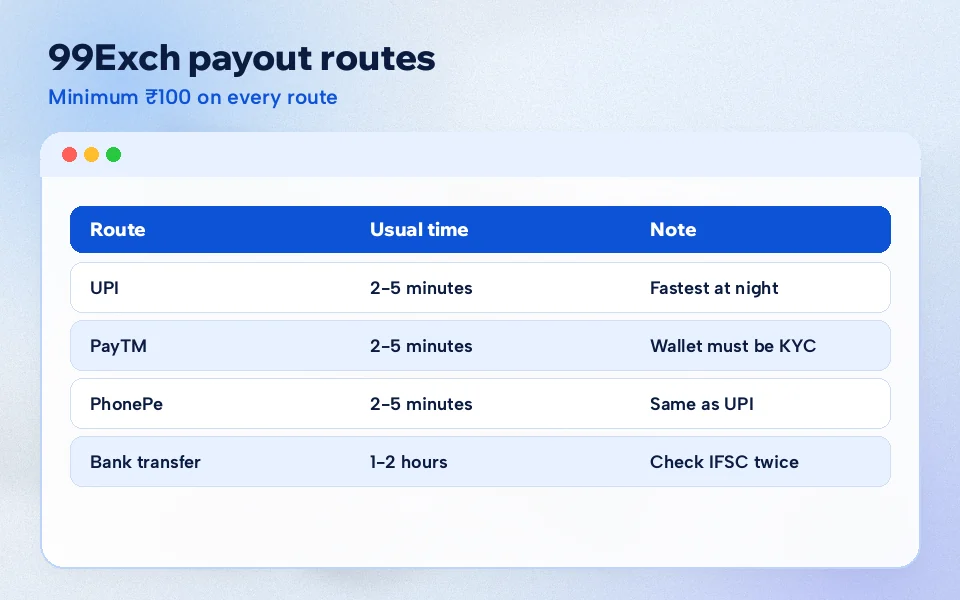
Four routes, two speeds. The table puts the 99Exch withdrawal options next to each other so the trade-off is obvious at a glance.
Payout route
Normal wait
Smallest amount
Requests accepted
Suits
UPI
2-5 minutes
₹100
24x7
Fast money to any UPI app on your phone
PayTM
2-5 minutes
₹100
24x7
Members who already keep a PayTM wallet
PhonePe
2-5 minutes
₹100
24x7
Members who pay through PhonePe day to day
Bank transfer
1-2 hours
₹100
24x7
Money straight into a savings or current account
The minimum does not change by route. ₹100 is ₹100 everywhere on 99Exch. What changes is the wait, and the gap is big: the slowest e-wallet payout is still far quicker than the fastest bank one.
Between the three quick routes there is little to choose on speed, since all of them sit in the same 2-5 minute group. If PhonePe is already the app you pay with, asking for UPI or for PhonePe makes almost no practical difference. The choice is really about which app you want to see the credit in, and which one you check most often.
So which one overall? It depends on where you want the money to end up. Take two members who both win ₹2,500 on the same evening and both ask for it at 11:30 pm. The first picks UPI, and the money is usualy sitting in the UPI app well before 11:40. The second chooses bank transfer because he wants it in his salary account, and he should expect it somewhere between 12:30 and 1:30 am. Neither did anything wrong. They simply picked different rails, and the 99Exch wallet paid each one at the speed of that rail.
Same ₹100 minimum on every 99Exch route; only the wait differs.
A small caution about the numbers. 2-5 minutes is the normal window for UPI and the e-wallets, and 1-2 hours for banks: normal, not a stopwatch guarantee on every single request. Most land inside it. When one does not, the next section is the place to start.
Also: if a first deposit came with the welcome offer, the terms for that sit on the 99Exch welcome bonus page; read them before asking for a payout so there are no surprises about what can leave and when.
99Exch Withdrawal Pending? Safe Checks to Run Before You Message Support
A 99Exch withdrawal that has not arrived falls into one of two situations, and they need different responses.
Still inside the window. UPI request sent three minutes ago, or a bank transfer sent forty minutes ago? It is not late yet. The 99Exch statement will already show it's withdrawal row. Give it the rest of the window before doing anything.
Past the window. More than 5 minutes on UPI or e-wallet, or more than 2 hours on bank. Now it is worth checking, in the order below, before writing to anyone.
Start with what you typed. Find the withdrawal line, open it, and compare the handle or account number character by character with what your bank app says it should be. A typical case runs like this: a member asks for ₹1,500 at about 10:40, nothing by 10:50, messages the desk, and the cause turns out to be a single missing letter in the UPI handle. Fixing that took less time than writing the the message did.
Second, the balance. If the money shows back in your 99Exch balance with a matching statement line, the request did not go through as sent: correct whatever was wrong and request it again.
Third, the amount. Below ₹100 the request will not be accepted at all, so a ₹95 attempt never left in the first place.
Fourth, which route you picked. People sometimes choose bank transfer by mistake and then wait for UPI speed. The statement row tells you which one went.
Bank transfers need one extra check of their own. Look at the credit list inside your bank app, not just the SMS inbox, because alerts sometimes trail the actual credit by a while. And count the 1-2 hours from the moment you confirmed on 99Exch, not from when you started worrying about it.
Still stuck after all four? Then it is a job for the 99Exch support desk, which works 24x7. Send the time of the request, the amount and the route in your first message; it saves a round of questions. The number and how to save it are on the 99Exch WhatsApp number page, and the destination site lists a separate Withdrawal option in its support chat so the message goes straight to the right people.
A first message along these lines is usually enough for the desk to find the request without a back-and-forth: withdrawal of ₹1,500 by UPI, confirmed at 10:41 pm, statement shows it, phone shows nothing yet. Four facts in one line, and a 99Exch agent can match it to the right statement row straight away.
99Exch Wallet FAQ — Quick Answers on Login, Payouts and Bet History
How do I open My 99 Exch after logging in?
Sign in with your 99Exch username and password and the member dashboard is the first account screen you reach. From there the wallet, matched and unmatched bets, statement rows and daily profit or loss are each one tap away, on any working 99Exch address.
How do I withdraw money from 99Exch?
Open the wallet in My 99 Exch, pick UPI, PayTM, PhonePe or bank transfer, enter ₹100 or more with your payout details and confirm. A withdrawal line appears in the statement straight away, and that line is how you track the request until the money arrives.
How long does a 99Exch withdrawal take?
UPI, PayTM and PhonePe payouts normally arrive within 2-5 minutes of confirming. A bank transfer takes 1-2 hours. 99Exch accepts requests 24x7, so late-night cash-outs follow the same timing, though these are normal windows rather than a fixed guarantee for every request.
What is the minimum withdrawal on 99Exch?
The smallest 99Exch withdrawal is ₹100, and that floor is the same on UPI, PayTM, PhonePe and bank transfer. A balance under ₹100 stays in the wallet until a settled win or a fresh deposit takes it over the limit, after which it can be requested normally.
What should I do if my 99Exch withdrawal is pending?
Check the window first: 5 minutes for UPI or e-wallet, 2 hours for bank. Past that, recheck the UPI ID or account number in the statement and see whether the amount returned to balance. Still stuck? Message 99Exch support with the time, amount and route of the request.
Where can I see my bet history on 99Exch?
Inside My 99 Exch. Open matched bets for positions still running, the statement rows for every settled bet and money movement, and profit and loss by day for a date-by-date result. Unmatched orders sit in their own list until they match or you cancel them.