99Exch App — Fast One-Thumb Stakes on Inplay T20 Cricket Right From Your Pocket
The 99Exch app reaches Android as an APK from the Download .apk button on the official login screen, and reaches iPhone as a Safari home-screen shortcut. Sign in with the same User Name and Password you use on any mirror. Inplay cricket opens first, stake presets sit under the price, and one thumb places the bet.
Three taps, one thumb. Price, preset, confirm. On the 99Exch app that is the whole bet when a T20 over is running and the market will not wait for you. New to the brand? The ID itself comes from the desk first, explained on the 99Exch new ID page, and then this same stake card works on every 99Exch mirror without a second account.
Real 99Exch App Screens You Meet After the Install
We opened the 99Exch lobby at phone width on 5 Oct 2026, sized to the width a 6-inch Android gives you in portrait. Below is what sits on each screen, in the order you will hit them. Nothing here is a mock-up.
Sign-in screen
A copy of the card the 99Exch mirrors show in a browser, which is the useful part: whatever works on 99exch.live works here, typos and all. A trial run without money sits behind its own Demo ID button, and our 99Exch Live login page covers that.
Lobby tabs
INPLAY comes first, then CRICKET, FOOTBALL and TENNIS. Under them are two small filter pills, LIVE and VIRTUAL, and a View by control that sorts matches by time.
Match rows
Each row gives the two sides, the date and the start time in IST. Small icons follow: a TV symbol on some fixtures, a BM tag for the bookmaker market, and a pin.
Odds grid
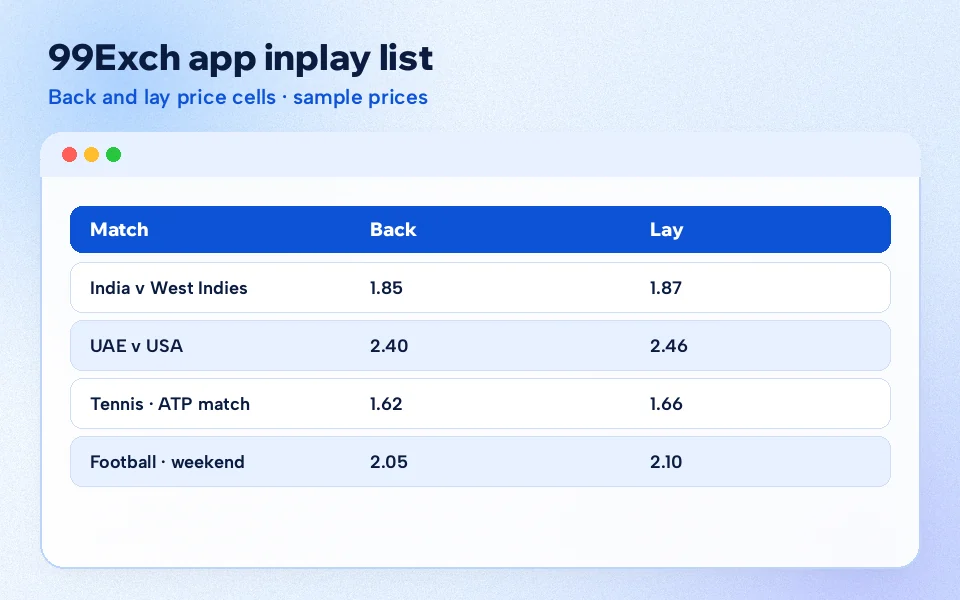
Three headings, 1, X and 2, each split into a back price and a lay price, so six cells per row. On cricket rows the X pair just shows dashes.
Stake presets
Choosing a price brings up a strip of ready amounts on the slip. Pick one, confirm, finished.
Support
A 24x7 support bubble stays parked in the lower right corner of the 99Exch lobby.
Small screen, big table. That is the trade. Team names wrap onto three, four, sometimes five lines on a a narrow phone, so a long fixture like a women's T20 between two associate sides can push the odds down the page. Turning the phone sideways helps more than you'd expect. The six price cells stop crowding each other and the team names fit on one or two lines.
One thing confuses first-timers: the lobby you see in the 99Exch app is the same lobby a mirror address loads in a browser. Every mirror we tested served the same small app bundle, about 12 KB on first load, which is why your 99Exch ID and balance follow you from one address to the next. Deposits and payouts are a separate subject; the timings live on My 99 Exch, the account and wallet page, not here.
99Exch App or Mobile Browser — a Clear Side-by-Side for Phone Users
Both doors open the same room. What differs is how you reach the door, and what happens when an address stops loading, which in India happens often because internet providers block betting domains on a rolling basis.
Point
99Exch app (APK or shortcut)
Mobile browser
How you get it
Android: Download .apk on a mirror login screen. iPhone: Add to Home Screen from Safari.
Type a working mirror address each time, or keep a bookmark.
Sign-in
User Name and Password, same as everywhere
User Name and Password, same as everywhere
Account and balance
One 99Exch ID, one balance
One 99Exch ID, one balance
Inplay cricket
INPLAY tab first, presets on the slip
Same lobby, same tabs, same slip
Address gets blocked
Reinstall or re-add from a mirror that still opens
Switch to another mirror address
Install needed
Yes on Android, a shortcut on iPhone
No
Suits
Daily users who bet during live overs
Occasional checks, shared phones
Where the 99Exch app wins. Speed to the first tap. You press one icon instead of typing an address, and the INPLAY tab is already waiting. During a run chase that saves real seconds.
Where the browser wins. No file to install, nothing to update, and on an iPhone it is the normal route anyway. If your phone is short on storage it is probaly the better pick.
The APK promo layer that pops over the 99exch.com lobby claims the app follows address changes by itself. We have not been able to verify that, so we would not count on it. Treat a blank 99Exch app the way you would treat a dead bookmark: get a fresh copy from an address that loads.
99exch app
99 exch app
99exch app download
99exch app for android
99exch app for iphone
99exch mobile app
99exch app login
my 99 exch app
99exch apk
99exch app review
99exch app kaise chalaye
Clear Answers on the 99Exch App and the 99 Exch App Spelling
Why both spellings of the 99Exch app reach one lobby
People type 99exch app with no gap and 99 exch app with one. Both searches mean the same mobile route into the same account, and nothing on the 99Exch side treats them differently.
The 99Exch app is not a separate product with its own wallet. It is a phone-sized door into the lobby the mirrors already serve, so one ID covers the app, the browser and every address in between.
Where each phone picks up the 99Exch app on this page's routes
Android users install from the Download .apk button on a mirror login screen. iPhone users make a Safari shortcut, because we could not confirm any App Store listing.
The step that trips Android users is the install-from-unknown-sources prompt, which our 99Exch APK page walks through screen by screen.
Android: APK from a working mirror login screen
iPhone: Share, then Add to Home Screen in Safari
Either phone: same User Name and Password afterwards
How the 99 Exch app behaves once you are signed in
INPLAY opens first, with cricket rows carrying the date, an IST start time and the six-cell back and lay grid.
Tap a price, tap a preset stake, confirm. That three-tap loop is the reason most regulars keep the 99Exch app on the home screen rather than a bookmark.
Fast 99Exch App Inplay Bet, Tap by Tap
Here is the loop during a live T20, written for a thumb rather than a mouse. It assumes you already hold a funded 99Exch ID; see the notes on funding a 99Exch ID if the balance is empty.
Start from the home screen Tap the 99Exch icon. Sign in only if the app asks for it.
Stay on INPLAY The first tab already lists matches in progress. If it is crowded with football and tennis, tap CRICKET instead.
Find the row Use the date and IST time on each row to pick the right fixture. On the busy October nights a West Indies T20 can sit next to a women's match.
Choose a side of the market Tap a price under the back column to bet for that team, or under the lay column to bet against it.
Hit a preset The slip opens with stake presets. One tap fills the amount; you can still type a different figure if none of them fit.
Confirm before the price moves Odds shift ball by ball in a chase, so a slow confirm can mean a changed price. If the slip warns you, read the new figure before pressing again.
Worked example, numbers ours. Say you back a side at 1.70 with a 500 preset. If that side wins, the slip returns ₹850, which is ₹350 profit plus your stake. Lay the same side at 1.73 for 500 instead and your exposure is ₹365, because you are covering the backer's winnings. The 99Exch app shows these figures on the slip before you confirm, so check them there rather than doing sums mid-over.
Why presets matter at all: typing an amount on a phone keyboard during the 18th over is slow and error-prone. A stray zero turns 500 into 5,000. Presets cut that risk to one deliberate tap, which is most of the reason this page bothers with them. Set them to amounts you actually use, not round numbers that look nice.
Picking 99Exch app presets around the way you actually stake
A fair test: could you place the bet with your eyes on the TV and only a glance at the phone? If the 99Exch app slip offers four amounts and you use one, the other three are just targets for a slipped thumb. Two or three presets spaced well apart (a small one, your usual, a rare bigger one) read clearly in half a second. Some people keep one low figure and tap it twice. Either habit works; the figure showing on the slip is what counts.
The October run of matches against the West Indies is where most people will try this for the first time, I suspect. Fixtures and start times are kept on the cricket 99 Exch match list for October, so we will not repeat them here.
Free 99Exch App Shortcut for iPhone Home Screens
No App Store listing for the 99Exch app turned up when we looked, and we would not trust one that claimed to be it without checking. The iPhone route is a shortcut, and it takes under a minute.
Safari, not Chrome Apple's own browser puts the 99Exch shortcut option where you expect it.
Load a working mirror Open a 99Exch mirror address that shows the login screen with User Name and Password.
Tap Share The square-with-arrow icon in Safari's toolbar.
Add to Home Screen Scroll the share sheet until you see it.
Name it Call it 99Exch so you find it fast, then tap Add.
From then on the icon behaves like any app on the phone. It signs in with the same 99Exch ID and shows the same balance. Whether Safari's address bar appears on top depends on how that mirror is set up, so don't be surprised either way.
Compared with Android there is less to maintain. A shortcut has no file inside it and nothing to update, so when a 99Exch address changes the only job is to re-add the icon from the new one. The flip side: you get no install prompt at all, and an iPhone user who has never used Add to Home Screen may not know the option exists until somebody shows them.
Blocked mirror, iPhone edition. The 99Exch icon still looks normal on the home screen, which is the confusing bit, but a tap brings up Safari's own error page. Long-press it, remove it, and repeat the five steps from whichever 99Exch address opens today. Your balance was never stored in the icon.
99Exch App on a 6-Inch Screen During a Live T20 — Real Limits
A 99Exch app lobby on a 6-inch phone is cramped. We have said it once, and it is the single thing worth planning around. Everything else is habit.
The INPLAY list on a narrow phone: two team names, a date and IST time, then six price cells per row.
The odds grid needs width. Six cells squeezed across a portrait phone leaves each one small, and a fat thumb can land on lay when it meant back. Landscape fixes most of that. So does zooming the phone's display size down one notch in Android settings, though that shrinks everything else too and not everyone likes it.
Notifications are the other trap. A message banner sliding over the bet slip at the wrong moment has cost more than one person a price. Put the phone on Do Not Disturb for the length of the chase if you can live without WhatsApp for twenty minutes.
The row icons are small on a phone, and they matter. A BM tag means the fixture also carries a bookmaker market, with its own prices separate from the back and lay grid. The TV symbol shows up on some rows and not others. On a 6-inch screen these sit right beside the team names, so give the 99Exch app a second look before deciding a match has no extra market or no picture; sometimes the icon is simply hidden behind a wrapped name.
Battery and data over 40 overs. An inplay lobby keeps refreshing prices for as long as it is open, so the 99Exch app draws data and screen power for the whole match. Keep the charger close for a full T20, and if signal drops, prices on the slip can be stale. Reload before confirming rather than trusting a frozen number.
A composite case we hear in some form every season: the APK goes on the phone on a quiet afternoon, the mirror behind it gets blocked by evening, and at the toss the 99Exch app opens to a blank white page. Nothing is wrong with the account. The fix is a fresh install from a mirror that loads, which takes a few minutes, so do it before the match rather then during.
Working Fixes When the 99Exch App Stalls or Will Not Open
Most 99Exch app problems fall into four shapes. Match the symptom, try the fix, and only then message support.
What you see
Likely cause
What to try
Blank screen or a cannot-be-reached message
The mirror address is blocked on your network
Swap between mobile data and Wi-Fi; if still blank, reinstall from a mirror login screen that loads
Android refuses to install the file
Install from unknown apps is off for your browser
Allow it for that browser only, install, then switch it back off
App opens, Login fails
Wrong User Name or Password, or a first-login temporary password
Check caps and spaces; ask the desk to confirm the details
Prices freeze mid-over
Weak signal or the lobby lost its connection
Close and reopen the 99Exch app, then check the slip price again
The first row is by far the most common one in practice. Indian ISPs block betting domains in waves, and a 99Exch app tied to a blocked address looks broken even though the account behind it is fine. Your ID and balance do not live in the app; they live on the 99Exch side, which is why reinstalling loses nothing.
Sign-in trouble is different. If you have only just received your ID, the password you were sent may be temporary, and a few people try it on the app before changing it. The standard sign-in flow, including what to do when the password is rejected, is on the 99Exch login help page. For anything beyond that, the login screens on .live, .red and .green carry a Contact On Whatsapp button that reaches the 24x7 desk.
Not every mirror carries the same buttons, which catches people out when they reinstall in a hurry. The .win login screen shows Login, Login with Demo ID and Download .apk, and stops there, with no WhatsApp or share button. So if you want the 99Exch app and a route to the desk on one screen, pick .live, .red or .green as your reinstall source. The account is identical whichever one you use.
One limit, though. We can tell you what the screens show and what usually fixes them. We can't see your account, so a stuck withdrawal or a disputed bet goes to the desk, not to a reinstall.
99Exch App FAQ — Six Clear Answers for Phone Users
How do I download the 99Exch app?
You need three things: an Android phone, a 99Exch mirror login screen that opens on your network, and your User Name and Password. The file comes from the Download .apk button on that screen. After a one-time permission prompt from the phone it installs like any other app, and the icon signs you straight in.
Is there a 99 Exch app for iPhone?
Not as an App Store download that we could confirm. On an iPhone you open a working 99Exch mirror in Safari, tap Share, then Add to Home Screen. The icon then sits beside your other apps and signs in with the same 99Exch ID and the same balance you use anywhere else.
Is the 99Exch app available on the Play Store?
Search results do show a Google Play listing called My 99 Exch, but we have not tested whether it is the same build. The route the official 99Exch login screens offer is the Download .apk button, so that is the install this page describes and the one we would point a new Android user to.
Is the 99Exch app better than the website?
Neither one changes your account, because the 99Exch ID and balance are identical on both. The app saves you typing an address on every visit and keeps the lobby one tap away. The browser needs no install at all and is the normal route on iPhone, so pick whichever your phone runs more smoothly.
Why is my 99Exch app not opening?
Most often the address behind it has been blocked on your network, or the install is out of date. Switch between mobile data and Wi-Fi first, then reinstall from a mirror login screen that still loads. If the app opens but sign-in fails, confirm your User Name and Password with 99Exch support.
Can I watch the live score in the 99Exch app?
Inplay rows show small icons, including a TV symbol on some fixtures, and prices keep moving while the match runs. Whether a score or picture is attached depends on that particular fixture, so check the icons on the row before relying on it. The odds grid itself updates during play either way.