99Exch Green — Genuine Mirror Domain to Reach Your Account When Links Break
Saved link timing out? 99Exch green, typed as 99exch.green, is a mirror address of the same exchange. Indian ISPs block betting domains name by name, so 99Exch answers on more than one. Sign in with the username and password you already have; the balance is the one you left. Checked working on 5 Oct 2026.
Three boxes, one tap. Nothing on this card is new to an existing 99Exch user, and that is the whole point of a mirror.
Why 99Exch Green Works — Trusted Mirror When an ISP Blocks the Main Link
Links break for a dull reason. A provider adds a betting domain to its filter and, from that moment, a bookmark you have used for months returns nothing. No notice, no error that explains itself. 99Exch keeps spare names for exactly that evening: green, red, live and win all lead to one exchange. Login details and money belong to the 99Exch ID rather than to any single name, so hopping to 99exch.green changes the road and leaves the account alone.
So 99exch.green is not a second company and not a fresh sign-up. It is a side gate into the same ground (the gate changes, your seat does not).
We opened 99exch.green on 5 Oct 2026 from an Indian mobile connection and wrote down what came back. The sheet below is that check and nothing more. A mirror can be blocked on one network and open on another, so read it as a dated snapshot of the 99Exch green address, not a promise about tomorrow.
Address tested
99exch.green, typed straight into a mobile browser
Date
5 Oct 2026, India mobile user agent
Server reply
A normal page load (status 200), served from Amazon S3 storage
Page title
Index, the same plain title every 99Exch mirror carries
Page size
12,242 bytes, byte-for-byte the same as .com, .live, .red and .win
What loads
The 99Exch logo, a LOGIN card with User Name and Password, then the buttons
Buttons
Login · Login with Demo ID · Download .apk · Contact On Whatsapp · Share This Apk to Friend
Small print
A reCAPTCHA notice sits under the two login buttons
Why the identical size matters Five addresses returning the exact same 12,242-byte file is about as clear a sign as you get that they are one build of 99Exch. The address moves. The app behind it stays put, which is why a password that worked on .com yesterday works on green today.
How a block hits one address and misses another
Blocks in India are applied by name, provider by provider. A list reaches one mobile network this week and a broadband company the next, and each adds the names on its own schedule. So on any given evening 99exch.com might be filtered on your SIM while 99exch.green has not been listed yet, or the reverse. Nobody outside the providers can say which address goes next. What 99Exch can do is keep the same account reachable through more than one name, and that is all the green mirror is for.
It also explains a confusing thing people report: green works on the phone but not on the laptop at home. Two different providers, two different lists. The address is the same, the 99Exch account is the same, only the route differs.
Put another way: if 99exch.green ever asked you to register again, or showed a balance of zero after you signed in, something would be wrong with the page you reached, not with your 99Exch account. A real mirror never starts you from scratch.
99exch green
99exch.green
99exch green login
99 exch green
99exch green link
99exch green mirror
99exch green id
99exch green apk
99exch green site
99Exch Green Search Terms — Clear Answers About the Mirror Address
What a search for 99exch green is really after
People type 99exch green, 99 exch green or 99exch.green when the address they normally use has stopped loading. All three point to one place: the green mirror of 99Exch, written with a dot before the word green. There is no separate green brand, app or wallet behind it.
Searching 99exch green link or 99exch green site tends to throw up lookalike pages, so typing the address directly is usually quicker than clicking a result.
The 99exch green login, box by box on the mirror card
On its screen, the 99exch green login asks for two things, with a demo path alongside. Here is what each part expects on the green address:
User Name
The username the 99Exch desk issued, unchanged across mirrors
Password
Whatever you last used on any 99Exch address
Login with Demo ID
A practice entry; no username of your own needed
Download .apk
The Android file, handed out by the same 99exch.green page
Why a 99exch green ID matches every other address
A 99exch green id is simply your normal 99Exch ID used on the green mirror. Nothing is created when you switch addresses, so the balance, open bets and history you see on green are the same ones you left on red, live or .com.
The same goes for a 99exch green apk search: the Download .apk button on green hands out the same Android build the other mirrors offer.
Sign In on 99Exch Green — Easy Steps From Address Bar to Balance
Six steps, most of which you already know from any other 99Exch address. The only new part is step one.
Type the address yourself Put 99exch.green in the address bar, not in the search box. A search for the phrase shows results you did not ask for; a typed address goes straight to the 99Exch mirror.
Look for the LOGIN heading Logo on top, then the User Name and Password boxes under it. Anything asking for card numbers or a brand-new registration is not the 99Exch mirror, so shut that tab.
Enter the username exactly Copy it from the desk's message if you can. One wrong character and the login fails, and it will look like a mirror problem when it isn't.
Enter your current password The one you used last time on any 99Exch address. Mirrors share it, so there is nothing separate to set for green.
Press Login A Google reCAPTCHA note sits under the buttons. Most of the time nothing pops up; occasionally a picture puzzle does, and the 99Exch lobby follows once it is solved.
Compare the figure The wallet amount after login is the one from your last session, wherever that was. A mismatch means you reached a lookalike, not the 99Exch mirror.
Under Login sits a second button with Demo ID in its name, and it leads somewhere else entirely: a practice session with no link to your username. We use it as a ten-second test of whether 99exch.green loads on a given network before typing anything real. For the rest of what that button does, the 99Exch Live page covers the demo entry properly.
If the password is rejected on every address, not just green, the trouble sits with the account, and the 99Exch login help for passwords and lockouts is the better place to start. Remeber that a mirror cannot fix a wrong password; it only gives you another road to the same lock.
What carries over when you move to the green address
Split it in two: account stuff and browser stuff. A change of address never touches the first kind, while the second kind is tied to whatever name sits in the address bar, which is why 99exch.green can feel oddly empty on a first visit.
Item
On 99exch.green
Why
Username and password
Same
Stored with the 99Exch account, not the address
Balance and open bets
Same
One wallet behind every mirror
Being signed in
Not carried over
The browser treats green as a new site, so you log in once
Saved password autofill
Usually missing
Browsers save passwords per address; .com and green are separate entries
Bookmarks
Add your own
A .com bookmark will not open green for you
The autofill row is the one that trips people. Your browser happily filled the password on .com for months, so you may not remember it when green shows empty boxes. Worth checking your saved passwords list before you actually need the mirror, not during a match.
A small habit that saves time After your first successful sign-in on 99exch.green, bookmark the login page right away. Next time the main 99Exch link breaks, the green address is one tap away instead of a search.
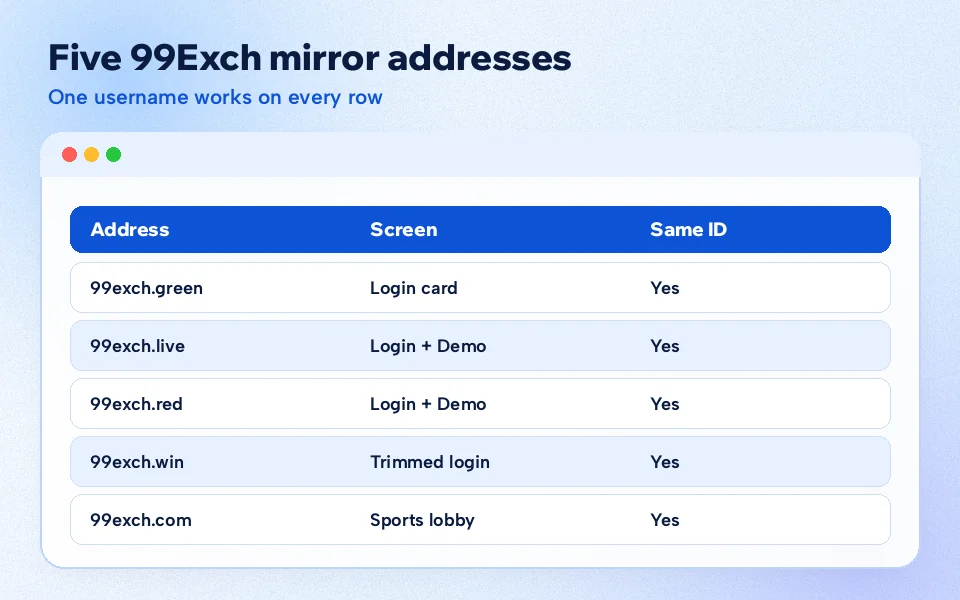
99Exch Green Next to Other Mirrors — Verified Five-Address Check
Same date, same phone, five addresses. Here is how 99exch.green compared with the rest of the 99Exch family on 5 Oct 2026, judged only by what showed on the first screen:
Address
First screen
Login + Demo ID
Download .apk
WhatsApp + Share buttons
99exch.com
Sports lobby, Login link top right
Login link in the top bar
Download APK pop-up over the lobby
24x7 support bubble instead
99exch.live
Opens on the LOGIN card
Both present
Present
Both present
99exch.red
Opens on the LOGIN card
Both present
Present
Both present
99exch.green
Opens on the LOGIN card
Both present
Present
Both present
99exch.win
Opens on the LOGIN card
Both present
Present
Neither shown
The .com row looks different only because that address skips the card and shows the 99Exch lobby first, with sign-in tucked into the top bar. Same file underneath, just a different first screen. For anyone who has only ever used .com, that LOGIN card on 99exch.green can feel unfamiliar for about five seconds.
Green and red came out identical: all five buttons, the reCAPTCHA line, the same 12,242-byte page. Live matched them too. Win dropped the WhatsApp and Share buttons but kept everything you need to sign in, and .com skipped the card entirely and dropped visitors into the 99Exch sports lobby.
What does that mean in practice? Not much, if you only want to log in. Any of the four card addresses takes the same username and password, and none of them is faster or "better" than the others in any way we could measure from one phone on one day. The difference that matters is which one your network lets through right now. Green may open where red is blocked; an hour later it could be the other way round. That is the nature of ISP blocks, and it is why keeping more then one mirror saved is sensible.
If you landed here after red stopped working, the 99Exch red mirror page has its own dated check, and the two addresses make a natural pair to bookmark together.
Four of the five 99Exch addresses opened on the same LOGIN card on 5 Oct 2026; green was one of them.
A sensible order to try the 99Exch addresses
There is no official ranking of mirrors, and we would not invent one. Still, if you want a routine instead of guessing, this order follows what we saw on the screen:
Your saved bookmark Whatever opened last time. Often it still does.
99exch.green Full LOGIN card with all five buttons on 5 Oct 2026.
99exch.red or 99exch.live Same card, same buttons, so nothing new to learn.
99exch.win Signs you in just as well, minus the WhatsApp and Share buttons.
The Android app When every browser address is filtered on your network.
Swap green and red around if red tends to open better for you. The order is a habit, not a rule.
A worked example from a weekday evening
Picture a common case, stitched together from the sort of messages a support desk sees. A user on mobile data opens their saved 99exch.com bookmark a few minutes before a match. It times out. They try again, same thing, then search the brand name and get a page of results that look half right.
Typing 99exch.green instead takes about as long as reading this sentence. The LOGIN card appears, the same username and password go in, and the balance shown is exactly what it was on .com the night before. Nothing was lost because nothing lived on the .com address in the first place.
Next morning .com loaded again on the same phone. Should they go back to it? Doesn't matter. Both addresses show the same account, so the choice is purely about which one answers first. Some people stick with whatever worked last; others keep .com as the default and treat 99exch.green as the spare. Either way the 99Exch wallet does not care which door you used.
5 addresses checked on 5 Oct 2026
4 opened on the 99Exch LOGIN card
12,242 bytes, the same file on every one
99Exch Green Not Opening — Working Fallbacks When the Link Breaks
Sometimes the green address will not load either. Usually that has a plain cause, and most of them can be sorted in a minute or two without contacting anyone at 99Exch.
Check the spelling first
The mirror is 99exch.green, with a dot. Not 99exchgreen.com, not 99exch-green, not 99exch.green.com. Typos in the address are the most common reason people think the 99Exch green mirror is down when it is actually fine. Autocomplete makes this worse: the browser suggests an old, wrong entry and you tap it without looking.
Blocked on this network, open on another
If the browser says the site cannot be reached, the green address has probably been blocked by the provider you are on right now. Switching from mobile data to Wi-Fi (or the reverse) is the quickest test. If 99exch.green opens on one and not the other, the address is fine; your connection is the one being filtered.
Page never loads
Likely a block. Try another mirror such as red or live, or another network. The 99Exch account is the same on all of them.
Page loads but stays blank
The small 12 KB file arrived but the rest of the app is slow. Give it a few seconds, then refresh once before trying a different address.
Spotting a page that only looks like green
Lookalike pages copy the 99Exch logo. They rarely copy the whole screen. On the real green mirror the address bar reads exactly 99exch.green, the tab title is the plain word Index, and the card offers Login, Login with Demo ID, Download .apk, Contact On Whatsapp and Share This Apk to Friend. A page that asks for a deposit before you have signed in, or wants your bank details on the first screen, is not the 99Exch login you are looking for. Close it and type the address again.
Not sure? Tap Login with Demo ID before typing anything of your own. On a genuine 99Exch mirror that button should open a practice session without asking for a phone number, a bank account or a deposit. If the demo path asks for personal details, you are on the wrong page.
Bookmarks and the APK as backups
The fix that stops all of this from happening again is boring: save several addresses before you need them. Make one bookmark folder, put the green, red and live login pages in it, and you have three ways in on on any given day. When one is blocked you open the next without searching.
The other backup sits right on the 99exch.green page. The Download .apk button gives you the Android app, which signs into the same 99Exch account. Install details, file size and update steps belong on the 99Exch APK download page, so we will not repeat them here. It is worth having as a second route, though, especially if browser addresses keep getting blocked on your network.
The two extra buttons on green
Below Download .apk the 99exch.green page carries two more buttons that the win address leaves out. Contact On Whatsapp opens a chat with the desk. Share This Apk to Friend passes the app on to someone else, which is mostly useful when a friend's browser cannot reach any mirror at all. Neither one signs you in, and neither is needed for a normal login.
And if everything fails at once? The Contact On Whatsapp button on green connects you to the same desk that issued the ID. They can tell you which address is answering that day. Probably faster than trying each one by hand, if you are in a hurry.
What to tell the desk if nothing opens
A short, specific message gets a quicker reply than "site not working". Mention which addresses you tried (green, red, live, win), whether you were on mobile data or Wi-Fi, and what the screen showed: an error, a blank page, or a LOGIN card that rejected the password. Those three details tell the 99Exch desk whether the problem is a block, a slow load or the account itself. A screenshot helps too, since it shows the exact address in the bar, which settles the spelling question straight away.
99Exch Green FAQ — Fast Answers on the Mirror Login
How do I log in to 99Exch green?
Open 99exch.green in the browser bar, then use the LOGIN card: your existing User Name, your current Password, and the Login button. There is no green-only registration. Whatever 99Exch ID you hold already works here, with the same balance and bet history it shows on other addresses.
Is 99Exch green an official 99Exch address?
On 5 Oct 2026 the green address served the same 12,242-byte page as 99exch.com, red, live and win, with the same LOGIN card and buttons. That identical build is why we treat it as a genuine 99Exch mirror. Always check the address bar reads exactly 99exch.green before signing in.
What is the difference between 99Exch green and 99Exch red?
Only the address. On 5 Oct 2026 both showed the same LOGIN card with all five buttons and the same reCAPTCHA notice. The username, password and balance are shared, so use whichever one your network opens at that moment and keep the other bookmarked as a backup.
Why is 99Exch green not loading?
Most often the address is blocked by your internet provider at that moment. Check the spelling first, then switch between mobile data and Wi-Fi. If it still fails, open the red or live mirror, or use the 99Exch Android app from the Download .apk button. Your account stays the same.