99Exch Login — Instant Captcha-Safe Entry to Bet From Any Working Mirror
Open a working mirror such as 99exch.live, paste the username your 99Exch desk sent into User Name, type the password with every capital exactly as issued, tick the captcha and press Login. A blank screen usually means that address is blocked, so try another mirror; a locked ID is reopened by the desk.
Same order as the real screen. On 99exch.live, .red and .green the 99Exch form asks for User Name first, Password second, then shows the reCAPTCHA note before the Login button. This mock does nothing by itself (the boxes are read-only). The button goes to the 99Exch desk site, which is where usernames are handed out and where a frozen ID gets sorted.
Five Fast 99Exch Login Steps From Address Bar to Lobby
Five moves. Most 99Exch sign-ins that fail break at step two or three, not at the captcha, which is why those two get the most words below.
Pick an address that opens. Type 99exch.live into the browser, or 99exch.red, 99exch.green or 99exch.win if that one stalls. Each loads the same 99Exch build, so whichever comes up first is the right one for today. 99exch.com behaves differently: it drops you into the sports lobby and the Login link sits top right (the 99Exch com login walkthrough covers that screen).
Paste the username, do not retype it. When your 99Exch ID was made, the desk sent a username on WhatsApp. Long-press it in the chat, copy, and paste into User Name. Retyping from memory is how a zero turns into the letter O.
Type the password with its capitals. The 99Exch password check is case-sensitive. If the desk wrote a capital K, a small k fails, every single time, with no hint about which letter was wrong.
Clear the captcha. Tick the box and wait for the mark to settle before touching anything else. If a picture grid appears, solve it once; tapping Login while it is still spinning just resets it.
Press Login and check whose account opened. Login with Demo ID is the other button on that same 99Exch form, and a quick thumb on a small screen hits it more often than you would expect. If what loads is not your own account, you probably pressed the demo option; the 99Exch live mirror page explains what that Demo ID is for.
That is the whole route. In practice step one changes week to week, because Indian internet providers block betting domains and an address that worked on Sunday can be dead on Thursday. Your 99Exch username and balance don't care which address you used; they live on the account, not on the domain.
First 99Exch sign-in versus a returning one
First time. You have a fresh WhatsApp message from the desk with a username and a temporary password, and nothing saved anywhere. Open the address in Chrome rather than inside the chat, paste both values, tick, press Login. The one extra job after you land in the 99Exch lobby is changing that temporary password, which is why first sign-ins take a little longer.
Every time after. The risk flips. Now the danger is the browser filling something stale: last month's password, a username from an older 99Exch ID, a mirror that has since been blocked. If a returning login fails, clear the boxes before you assume the account is at fault.
99Exch Login Captcha — Why the Safe Check Appears and How to Clear It
Every 99Exch login screen we opened on 5 Oct 2026 (.live, .red, .green and .win) carries a reCAPTCHA notice under the form. Its job is narrow: tell a person apart from a script that tries thousands of passwords against one username. For you it should be one tick.
Sometimes it isn't. The check looks at the browser and the network, and a few setups make it suspicious, probably more often than the screen lets on:
In-app viewer Links opened inside the WhatsApp chat load in a cut-down browser. Copy the 99Exch address into Chrome instead.
Shared network Office Wi-Fi or a busy hotspot puts many people behind one address, so the captcha asks for more puzzles.
Repeated taps Pressing Login three times while the tick is still loading counts as three attempts, not one.
A composite case from the desk chats: someone copied the 99exch.live link straight from WhatsApp, opened it in the in-chat viewer, and got the traffic-light picture grid six times running. Same link pasted into Chrome: one tick and the 99Exch lobby. Nothing about the account changed. Only the browser did.
If the captcha box never draws at all (an empty space where it should be), that is a loading problem rather then a puzzle problem. Reload once. Still empty? Move to another mirror address; the next row of the error table below deals with it.
Exact 99Exch Username and Password — Clear Rules for Capitals and Spaces
Most refused 99Exch logins we hear about had the correct password in them. What broke was one character: a capital, a space, an autofilled leftover. These are the four places it happens.
Where the username comes from
Look in the WhatsApp thread where you asked for an account: the 99Exch reply carries the username on one line and a temporary password on the next. No reply yet? The new 99Exch ID page explains what to send and how long it takes.
Capitals
Case-sensitive, both fields to be safe. Treat User Name the same way even if you suspect it would forgive you.
Spaces
Copying from a chat bubble often drags a space onto the end. It is invisible in the 99Exch form and enough to fail the match.
Autofill
Phones love to offer an old saved login. If you had an earlier 99Exch ID, the keyboard may fill the old username before you notice.
Worked example, made-up values: the desk sends username ravi4521 and password Tm8kQz. Typing tm8kqz fails. Typing Tm8kQz with a space after the z fails. Pasting both straight from the chat, then deleting any trailing space, works first go. The account was never the problem.
Once you are in, change that temporary password. The steps for changing it, and for the OTP that appears once 2FA is on, live on the 99Exch login password page so they are not repeated here. One caution. If you pick a new password with capitals, write down which letters are capital, because the 99Exch screen will not tell you later.
99Exch Login Errors — Quick Fixes for the Five Usual Stops
Find the line that matches what your screen is doing. The fix column is in the order we would try things, cheapest first.
What happens
Likely cause
What to do
Login refused straight after pressing Login
Capital letter typed small, trailing space, or an old autofilled username
Clear both boxes, paste username and password fresh from the desk chat, delete trailing spaces, try once.
Captcha keeps asking for more pictures
In-app browser, crowded network, or repeated taps on Login
Open the 99Exch address in Chrome, wait for the tick, then a single tap on Login.
Captcha box empty or never draws
Script blocked or the mirror half-loaded
Reload once, then switch to a different 99Exch mirror address.
ID shown as locked or frozen
Several wrong attempts, or a hold placed on the account
Leave the form alone and send your username to the 99Exch desk on its Password Issue line.
Page blank, or the address will not open
The domain is blocked by your internet provider
Try 99exch.live, .red, .green or .win in turn; the same ID works on each.
Working out which stop you hit, in three checks
When a 99Exch login fails and the screen gives no reason, run these in order. They take under a minute together and each one rules out a row of the table.
Did the page fully draw? If the form, the captcha notice and both buttons are there, the address is fine and the problem is in what you typed. If anything is missing, it is the address; switch mirrors before you touch the password.
Did the captcha show a settled tick? No tick, no sign-in. A spinning or empty box points at the browser or the network, not the account.
Was the text pasted fresh? Clear both boxes completely, paste from the desk chat, check for a trailing space. If that still fails, stop there. A second identical failure with clean details means the desk needs to look at the 99Exch ID itself.
Row four is the one people get wrong. After a refusal or two, the natural move is to keep guessing, and every extra guess makes the 99Exch lock harder to explain to the desk. Two failed tries with pasted details is the point to stop and ask. And row five is not an account fault at all: its the network, and switching address fixes it within seconds.
99exch login
99 exch login
99exch win login
99exch login page
99exch login id
99exch login password
99exch login app
99exch login pc
99exch login account
99exch login portal
99 exch id login
99exch login demo id
99Exch and 99 Exch Login Searches — Real Answers in Four Tabs
Where the 99exch login page sits on each address
People search 99exch login and 99 exch login (with the gap) for the same screen. On .live, .red, .green and .win that screen is the first thing to load. On 99exch.com you reach it from the Login link above the sports lobby.
A 99Exch login portal or login account search lands in the same place. There is one sign-in form; the addresses just change.
Which 99exch login ID goes into User Name
User Name wants the username and nothing else. A new 99Exch account arrives as two values in one desk message, and the temporary password goes in the box under it. Unsure which string is which? Ask before testing both orders, since each wrong order probably counts as a failed try. Then:
Username pasted, not typed.
Password matches capital for capital.
No space after either value.
What 99exch win login changes for your account
Nothing on the account side. The 99exch win login screen accepts the same username and password as every other 99Exch mirror.
It is simply the shortest screen of the set, with three buttons and no WhatsApp contact link, so keep the desk number saved somewhere else.
99 exch login in the APK and on a PC browser
A 99exch login app search usually means the Download .apk button found on each mirror screen, while 99exch login pc just means the same address in a desktop browser; the username and password stay identical on both.
99Exch Win Login Explained, Plus Every Working Mirror Address
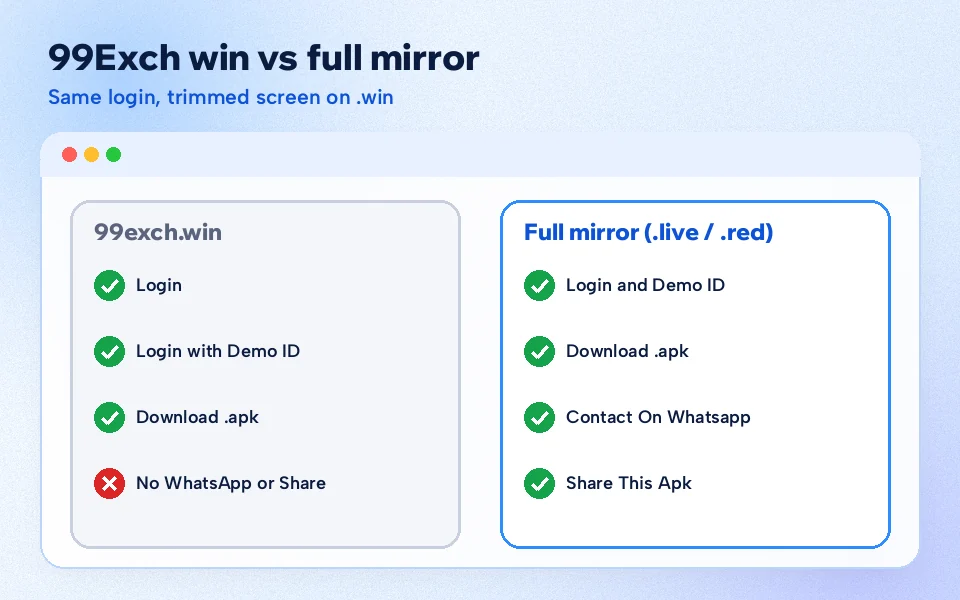
Three buttons. That is all 99exch.win gave us on 5 Oct 2026: Login, Login with Demo ID, Download .apk. The WhatsApp contact and the share-the-APK option that .live and .red carry were missing. Your sign-in does not notice the difference (one username, one password, one 99Exch account on every mirror), yet getting stuck on .win means the desk is not a tap away from that screen.
One build, several doors. Indian internet providers block betting domains now and then, and each 99Exch mirror address is a spare door into the same account with the same balance.
Address
What the screen showed, 5 Oct 2026
More detail
99exch.com
Sports lobby first, Login link top right, an APK promo layer you can close
Our own habit: keep two addresses bookmarked, .live and .win, and only reach for the others when both fail. Hard to say which one an ISP will block next, so having a spare costs nothing.
One situation deserves its own line. Say .win is the only 99Exch address that opens on your connection tonight and your login is refused. The screen has no WhatsApp button, so the desk is one step further away than usual. Open WhatsApp separately, find the chat where your username arrived, and message from there. Keep the .win tab open while you wait; once the desk confirms the ID is fine, you can retry on the same screen without hunting for a new address.
The .win screen keeps only three buttons; the sign-in itself is identical on every 99Exch mirror.
Frozen 99Exch ID — Fast Desk Reopening and the Shared-Phone Trap
A locked or frozen 99Exch ID does not open again by waiting at the login screen and trying harder. The desk reopens it. On the 99Exch desk site the WhatsApp help is split into four lines: New ID, Deposit Issue, Withdrawal and Password Issue. Pick Password Issue, send your username, and say what the screen showed: a refusal, a lock notice, whatever it was. A screenshot saves a round of questions.
Username
Pasted from the original desk message, so nobody has to guess between a zero and an O.
Which address
The 99Exch mirror you were on, for example 99exch.live or 99exch.win.
What the screen said
Refusal, lock notice, endless captcha. A screenshot beats a description.
Last success
Roughly when you last got in. It helps the desk see whether something changed on the account.
When the reply comes back, sign in once, carefully, with pasted details. If the desk sets a new temporary password, treat it like the first one: capitals as sent, changed soon after. Chat with the original username gone, say after a new phone? Start from the 99Exch WhatsApp number page instead.
What not to do while you wait: keep hammering the form on another mirror. The lock sits on the account, so switching from .live to .red changes nothing, and fresh failures just add to the the record the desk has to look at.
Saved logins split across mirrors. A browser remembers passwords per address, not per account. So 99exch.live may still hold the temporary password from your first day while 99exch.red keeps the newer one you chose later, and anybody else who uses that handset gets both offered to them. After a password change, delete the old 99Exch entries from the saved-password list and let a single fresh one build up on the address you use most.
99Exch Login in Chrome or the APK — the Easy Daily Choice
Both use one 99Exch account. The difference is mostly about blocks and habit.
Browser sign-in on a 99Exch mirror
Nothing to install. You type an address, paste the username, tick the captcha. When an address gets blocked you move to the next one in seconds. The cost: you depend on whichever 99Exch mirror is reachable that day, and on the captcha behaving.
APK sign-in after Download .apk
Every 99Exch mirror screen carries a Download .apk button. Once installed, you open the app and enter the same username and password. Fewer address hunts, by most accounts. Install steps and permissions are on the 99Exch APK page.
After you are back in, withdrawals and the rest of the money side are handled on My 99 Exch. Our take on the route itself, for what it is worth: use the browser for the first login so you know your details work, then decide about the APK. Planning to follow the West Indies T20Is this month? Sign in well before the toss, not during the anthem; the fixture list is on Cricket 99 Exch. Cricket, football, tennis, casino tables and Andar Bahar all sit behind that single 99Exch login, whichever route you choose.
99Exch Login FAQ — Quick Answers Straight From the Sign-In Screen
Where is the 99 Exch login page?
The 99 Exch login page is the first screen on 99exch.live, 99exch.red, 99exch.green and 99exch.win, with User Name and Password boxes above a Login button. On 99exch.com the sports lobby loads first and the Login link sits top right. If one address will not open, move to the next.
What is my 99Exch login ID and password?
It is the username in the WhatsApp reply that opened your account, and the password is the temporary key sent right under it. Copy both out of that chat so no capital letter changes, sign in on any 99Exch mirror that loads, then replace the temporary key with one only you know.
How does 99exch win login work?
It uses the same username and password as any other 99Exch mirror, so 99exch win login opens the same account and balance. Only the screen differs: Login, Login with Demo ID and Download .apk appear, with no WhatsApp button underneath. Tick the captcha first, then press Login.
Why is the 99Exch login captcha not loading?
The 99Exch captcha usually fails to load because the page only half-loaded or the link was opened inside the WhatsApp chat viewer. Copy the address into Chrome, reload once and wait for the tick. If the box still stays empty, switch to another mirror address such as .red or .green.
What should I do if my 99Exch account is locked after wrong passwords?
Do not keep guessing; a frozen 99Exch ID only reopens when the desk clears it. Message them on WhatsApp under Password Issue, paste your username and attach a screenshot of the lock notice. Trying other mirror addresses will not get round it, since the hold sits on the account rather than the domain.
Can I use my mobile number for 99Exch login?
Only if the desk issued your mobile number as the username. The 99Exch mirror form asks for a User Name, so type whatever username the desk sent you on WhatsApp. If you are unsure which one it is, check that first chat or ask the desk under Password Issue before trying again.
Can I log in to 99Exch on two phones?
Yes, the same 99Exch username and password work on any mirror address and inside the APK, so a second phone signs in the same way. The login screens we checked on 5 Oct 2026 showed no device limit. If a second sign-in behaves oddly, ask the desk before trying again.